In today’s fast-paced digital world, email automation workflows have become essential for businesses looking to streamline their communication and connect with customers on a deeper level. Imagine being able to send timely, personalized messages that resonate with your audience without the constant manual effort. This article will guide you through the ins and outs of email automation workflows, providing practical steps, examples, and best practices to help you build efficient campaigns that not only save time but also boost your marketing effectiveness. Whether you’re a seasoned marketer or just starting out, you’ll find valuable insights to elevate your email strategy and foster meaningful relationships with your customers.
What is an Email Automation Workflow?
An email automation workflow is a structured series of actions that automate the process of sending emails to your customers. It helps businesses streamline their communication, ensuring that the right messages reach the right people at the right time. But what does that really mean?
Imagine being able to send personalized emails based on customer behavior without lifting a finger. That’s the magic of email automation workflows. They allow you to create a sequence of emails that can respond to specific triggers, like a customer’s purchase or a sign-up on your website.
These workflows typically start with a trigger event. For instance, when someone subscribes to your newsletter, an email workflow can kick off to welcome them. This not only saves time but also enhances the customer experience by providing timely information.
- Welcome emails for new subscribers
- Follow-up emails after a purchase
- Reminder emails for abandoned carts
Email automation workflows can be as simple or complex as you need them to be. You can create a series of emails that guide a customer through their journey, from initial interest to post-purchase engagement. Each step in the workflow can be tailored to fit the unique needs of your audience.
For example, if a customer makes a purchase, you might want to send them a thank-you email, followed by a series of emails that provide tips on using the product they bought. This not only keeps your brand top-of-mind but also adds value to the customer’s experience.
| Trigger Event | Email Action |
|---|---|
| Newsletter Subscription | Send Welcome Email |
| Purchase Made | Send Thank You Email |
| Cart Abandonment | Send Reminder Email |
One of the greatest benefits of using email automation workflows is the ability to analyze their effectiveness. You can track open rates, click rates, and overall engagement. This data helps you refine your approach, ensuring that your emails resonate with your audience.
Over time, you’ll find what works best for your customers. You might even discover that certain types of emails lead to higher engagement or sales. Isn’t that a fantastic way to improve your marketing strategy?
In summary, an email automation workflow is not just a tool; it’s a way to enhance your customer relationships. By automating your email processes, you save time and provide value to your customers. So, are you ready to implement email automation into your strategy?
How to Create an Email Automation Workflow
Creating an email automation workflow is a powerful way to enhance your marketing strategy. It allows you to send targeted emails to customers automatically, saving you time and effort. But how do you get started?
First, define your goals. What do you want to achieve with your email automation? Whether it’s nurturing leads, onboarding new customers, or promoting a new product, having a clear objective will guide your workflow design.
Next, map out the customer journey. Understand the stages your customers go through, from awareness to purchase. This insight helps you create a relevant email workflow that resonates with your audience.
- Awareness
- Consideration
- Purchase
- Post-purchase
Once you have your goals and customer journey defined, it’s time to choose an email marketing platform. Look for features that allow for easy automation. Many platforms offer user-friendly interfaces to help you set up workflows without needing to be tech-savvy.
Now, let’s get into the nitty-gritty of building your email automation workflow. Start by segmenting your audience. This means dividing your customers into groups based on their behavior, preferences, or demographics.
Here’s a simple table that shows common segmentation criteria:
| Segmentation Criteria | Description |
|---|---|
| Demographics | Age, gender, location |
| Behavioral | Purchase history, website activity |
| Engagement | Email opens, clicks |
With your segments in place, decide what triggers your emails. Triggers can be actions like signing up for a newsletter, completing a purchase, or even abandoning a cart.
Think about the content of your emails as well. Each message should be tailored to the segment and the stage of the customer journey. Personalization goes a long way in building relationships.
What about the timing? It’s crucial to send your emails at the right moment. Test different times and frequencies to see what works best for your audience.
- Welcome emails immediately after sign-up
- Follow-up emails after a purchase
- Reminders for abandoned carts
Finally, don’t forget about testing and optimizing your email automation workflow. Monitor the performance of your emails, analyzing open rates, click-through rates, and conversions. Adjust your strategy based on the data to keep improving.
Creating an effective email automation workflow takes time and effort, but the benefits are worth it. By automating your emails, you can focus on other important aspects of your business while still engaging with your customers.
Best Practices for Email Workflow Automation
Email automation workflow can be a game changer for your marketing strategy. It helps you connect with your customers at the right time, delivering relevant content that resonates with their needs.
But how do you set up an effective email workflow? Here are some best practices to guide you.
- Define clear goals for your email automation.
- Segment your audience for personalized messaging.
- Test and optimize your workflows regularly.
First, start by defining your goals. What do you want to achieve with your email workflows? Whether it’s nurturing leads, re-engaging customers, or promoting a new product, having clear objectives will shape your automation strategy.
Next, consider audience segmentation. Not all customers are the same, and your emails shouldn’t be either. By categorizing your audience based on their behavior, preferences, or demographics, you can tailor your messages to meet their specific needs.
| Segmentation Criteria | Example |
|---|---|
| Purchase History | Customers who bought product A |
| Engagement Level | Active vs. inactive subscribers |
After setting up your segments, it’s essential to create an engaging email content strategy. What value can you provide? Whether it’s tips, offers, or updates, make sure your emails are informative and engaging.
Don’t forget the importance of testing your workflows. A/B testing can help you determine which subject lines, content, or calls to action perform best. This way, you can continuously refine your email workflows for maximum impact.
- Monitor key metrics like open rates and click-through rates.
- Adjust your strategies based on performance data.
- Stay compliant with email regulations.
Finally, keep an eye on your performance metrics. Are your emails being opened? Are customers clicking through? Monitoring these metrics can provide valuable insights into what’s working and what isn’t.
And let’s not forget about compliance. Ensure that your email automation workflows adhere to regulations like GDPR or CAN-SPAM. This not only protects your business but also builds trust with your customers.
By following these best practices, you can create effective email automation workflows that not only save you time but also enhance your customer relationships. Ready to dive into email automation?
Email Workflow Automation Examples You Should Know
Email automation workflows are powerful tools for businesses looking to streamline their communication. By setting up automated emails, you can nurture leads, engage customers, and save valuable time. But what does a typical email workflow look like? Let’s explore some examples that can enhance your email marketing strategy.
One common email workflow is the welcome series. When a new customer signs up, you can automatically send a series of emails introducing your brand and products. This not only makes your customers feel valued but also sets the stage for future interactions.
Consider the following components of a welcome series:
- Initial welcome email
- Introduction to product features
- Exclusive offers for new subscribers
Another effective email automation workflow is the abandoned cart series. If a customer adds items to their cart but doesn’t complete the purchase, you can send a reminder email. This gentle nudge can significantly increase conversion rates.
Here’s how an abandoned cart workflow typically looks:
| Email Stage | Purpose |
|---|---|
| First Reminder | Prompt to complete purchase |
| Second Reminder | Incentive, like a discount |
Have you ever received an email like this? It’s a clever way to recover potentially lost sales.
Another great example is the post-purchase follow-up email. After a customer makes a purchase, an automated email can thank them and ask for feedback. This not only builds a relationship but also encourages repeat business.
Consider the elements of a post-purchase email:
- Thank you message
- Request for product review
- Suggestions for related products
Lastly, let’s talk about re-engagement workflows. If a customer hasn’t interacted with your emails in a while, you can set up an automation to send them a “We miss you!” email. This can be a fantastic way to rekindle interest and bring them back into your sales funnel.
In summary, email automation workflows can significantly enhance your marketing efforts. By implementing strategies like welcome series, abandoned cart reminders, post-purchase follow-ups, and re-engagement emails, you can create a seamless experience for your customers while saving time and resources.
Are you ready to set up your email automation workflow?
How Email Automation Differs from Traditional Campaigns
Email automation workflow has revolutionized the way businesses connect with their customers. Unlike traditional campaigns, which often rely on a one-size-fits-all approach, automation allows for a more personalized and timely engagement.
In traditional campaigns, marketers usually send out a single email blast to their entire list. This means that every recipient gets the same message, regardless of their individual behavior or preferences. But what if you could tailor your emails based on customer actions? That’s where email automation comes in.
With email automation, you can create workflows that respond to specific customer actions. For example, if a customer makes a purchase, you can automatically send them a thank-you email, followed by a series of emails designed to encourage repeat business. This not only enhances the customer experience but also increases the likelihood of additional purchases.
- Personalized messaging based on customer behavior
- Timely communication that aligns with customer actions
- Increased engagement through targeted content
In a traditional setup, there’s often a significant delay between sending an email and receiving a response. With automation, you can send emails immediately after a trigger event, such as a cart abandonment or a special offer. This immediacy can significantly improve conversion rates.
Another key difference is the ability to segment your audience effectively. Automation allows you to create targeted email workflows that cater to different customer segments. You can group customers based on their purchase history, preferences, or engagement levels. This means you can send the right emails to the right people at the right time.
| Aspect | Traditional Campaigns | Email Automation |
|---|---|---|
| Message Customization | One-size-fits-all | Personalized based on behavior |
| Timing | Scheduled sends | Triggered by customer actions |
| Audience Segmentation | Limited | Dynamic and detailed |
Additionally, tracking and analyzing the performance of your email campaigns is much easier with automation. You can measure open rates, click-through rates, and conversions in real-time. This data allows you to refine your email workflows continuously.
Isn’t it fascinating how automation can take the guesswork out of your email strategy? By leveraging data and customer interactions, you can create a more effective communication strategy that fosters loyalty and drives sales.
In conclusion, the shift from traditional campaigns to email automation workflows represents a significant evolution in marketing. By embracing automation, businesses can not only enhance their customer engagement but also streamline their marketing efforts for better results. So, why not consider implementing an email automation strategy today? It could be the key to unlocking your marketing potential.
9 Automated Email Workflow Examples to Inspire You
Email automation workflows can transform the way you engage with your customers. They save time and ensure your messages reach the right people at the right moment. But what does an effective email workflow look like? Let’s dive into some inspiring examples.
Welcome Series Workflow: When someone signs up for your newsletter, they should be greeted warmly. A welcome series can include a thank you email, an introduction to your brand, and a special offer. This series sets the tone for your future communications.
Abandoned Cart Emails: Did you know that nearly 70% of shopping carts are abandoned? An automated workflow can send a reminder email to those customers, encouraging them to complete their purchase. This simple step can significantly boost your sales.
- Welcome email
- Follow-up with a discount
- Testimonial or review email
Birthday or Anniversary Emails: Celebrate your customers’ special days! Sending personalized emails on birthdays or anniversaries can create a strong emotional connection. Consider including a special discount or gift to make them feel valued.
Post-Purchase Follow-Up: After a customer makes a purchase, an automated email workflow can thank them and ask for feedback. This not only shows you care but also opens a channel for future communication. Plus, it’s a great opportunity to upsell.
| Workflow Type | Purpose |
|---|---|
| Welcome Series | Introduce your brand |
| Abandoned Cart | Recover lost sales |
| Birthday Emails | Enhance customer loyalty |
Re-engagement Campaigns: If a customer hasn’t interacted with your emails in a while, it’s time to reach out. An automated workflow can send a series of emails to rekindle their interest. Maybe a special offer will do the trick!
Event Reminder Emails: If you host webinars or live events, an automated reminder can keep your customers informed. A series of reminders leading up to the event can boost attendance and engagement.
- Initial invitation
- 1-week reminder
- Day-of reminder
Feedback Requests: After a customer interacts with your service, send an email asking for their thoughts. This not only shows you value their opinion but also helps gather insights for improvement.
Product Recommendations: Based on a customer’s past purchases, an automated workflow can suggest related products. This personalized touch can drive additional sales and enhance the shopping experience.
Newsletter Sign-Up Confirmation: When someone signs up for your newsletter, send a confirmation email. This automated workflow reassures them that they’re on the right track and can set expectations for future communications.
As you can see, there are numerous ways to implement email automation workflows. Each example demonstrates how automation can enhance customer interactions and drive business results. Which of these workflows will you try first?
How to Build an Email Automation Workflow in Mailjet
Creating an email automation workflow in Mailjet can transform how you engage with your customers. It allows you to send timely and relevant emails that resonate with your audience. So, how do you get started?
First, log in to your Mailjet account. If you don’t have one, creating an account is quick and easy. Once you’re in, navigate to the “Automation” tab. This is where the magic happens!
Next, you’ll want to define your goals. What do you want your email workflow to achieve? Here are some common objectives:
- Welcome new subscribers
- Follow up after a purchase
- Send reminders for abandoned carts
- Engage customers with personalized offers
Once you have your goals set, it’s time to map out the customer journey. Think about the key touchpoints where you can engage your audience. This journey will guide your email workflow.
Mailjet offers a user-friendly interface to create your workflow. You can start by selecting a trigger. A trigger could be an action like signing up for a newsletter or making a purchase.
After choosing your trigger, you can add actions. Actions are what you want to happen when the trigger occurs. For example, you might want to send a welcome email immediately after someone subscribes.
| Trigger | Action |
|---|---|
| New Subscriber | Send Welcome Email |
| Purchase Made | Send Thank You Email |
Now that you’ve set your triggers and actions, it’s essential to personalize your emails. Personalization can significantly increase engagement. Use the customer’s name, recommend products based on previous purchases, or send tailored content.
After crafting your emails, it’s time to test your workflow. Mailjet allows you to preview and test your automation before going live. This step is crucial to ensure everything works as intended.
Once you’re satisfied, activate your email automation workflow. Monitor its performance over time. This is where you can optimize and refine your strategy based on customer interactions.
Remember, the goal of your email workflow is to build relationships. Engage with your customers at the right time with the right message. It’s about creating a seamless experience that feels personal and relevant.
In conclusion, building an email automation workflow in Mailjet is a straightforward process that can yield significant results. With careful planning and execution, you can enhance your email strategy and better connect with your audience.
Send Email from Your Account: A Step-by-Step Guide
Sending emails as part of your email automation workflow can be a game changer for your business. It saves time and ensures that your communications are timely and relevant. Let’s dive into how you can easily set this up!
First, you’ll want to log into your email account. Make sure you have all the necessary information ready, such as the recipient’s address and the content you wish to send. Having everything organized will streamline your workflow.
Next, consider the purpose of your email. Are you reaching out to a customer who just made a purchase? Or perhaps following up on a previous conversation? Knowing the intention behind your email helps shape the message.
- Gather recipient information
- Draft your email content
- Decide on the email’s tone and style
Once you have your content ready, it’s time to choose how you want to send your email. You can send it immediately or schedule it for later. Scheduling can be particularly useful in your email workflow, allowing you to reach customers at optimal times.
To set up a scheduled email, look for the scheduling option in your email service. Most platforms allow you to select a date and time for your email to be sent. This feature enhances your automation strategy, ensuring timely delivery.
Now, let’s talk about personalization. Emails that feel personal tend to perform better. Use the recipient’s name and reference past interactions if possible. This small touch can significantly impact how your email is received.
After you’ve personalized your email, it’s crucial to review it. Check for typos or errors that could detract from your message. A well-crafted email not only looks professional but also reinforces your brand’s credibility.
| Email Element | Importance |
|---|---|
| Subject Line | Captures attention |
| Personalization | Builds connection |
| Call to Action | Encourages response |
Finally, hit send! Or, if you’ve scheduled it, sit back and relax. Your email automation workflow is now in motion. Remember, the key to successful email communication lies in consistency and relevance.
As you continue to refine your email strategy, keep track of engagement metrics. This data will help you understand what works and what doesn’t, allowing you to improve your future email workflows.
Build an Approval Process and Send Notifications via Email
Creating an effective email automation workflow is crucial for streamlining your business processes. One key component is building an approval process that ensures all necessary parties are informed and involved.
Start by defining the steps in your approval workflow. Who needs to approve what? What criteria will trigger notifications? This clarity will help you design a more efficient process.
Next, consider how you want to send notifications. Automated emails can keep everyone in the loop without manual effort. You can set up triggers based on specific actions, like a customer making a purchase or submitting a request.
Here’s a simple breakdown of how to set this up:
- Identify the approval stages.
- Define who receives notifications.
- Choose the right automation tool.
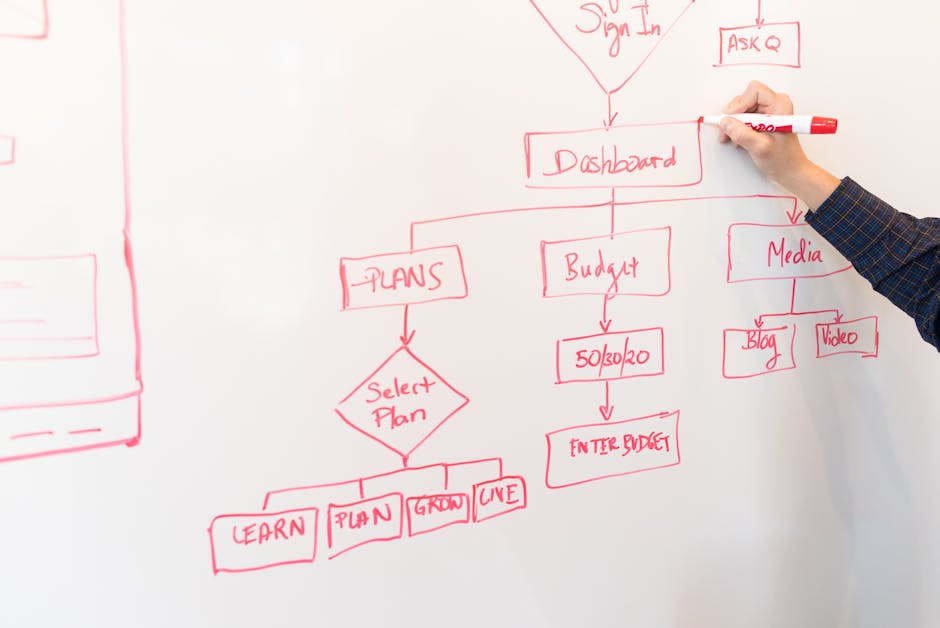
Using a visual workflow can help you map out these steps. A clear diagram can illustrate how emails are sent at each stage. This not only aids in understanding but also makes it easier to implement your email workflow.
Once your workflow is defined, it’s time to automate. Most email automation tools allow you to create custom workflows that include sending emails at key points.
For example, when a purchase is made, an email can be sent to the customer confirming the transaction. Additionally, a notification can be sent to the relevant team member for approval.
| Step | Action |
|---|---|
| 1 | Customer makes a purchase |
| 2 | Send confirmation email to customer |
| 3 | Notify team member for approval |
By automating these notifications, you save time and reduce the risk of errors. Plus, it keeps your team and customers informed, enhancing overall satisfaction.
Isn’t it amazing how a well-structured email automation workflow can transform your operations? Start building yours today!
In conclusion, implementing an email automation workflow is not just a trend; it is a vital strategy for businesses aiming to enhance their communication and engagement with customers. By streamlining repetitive tasks and personalizing outreach, companies can save time, reduce human error, and ultimately drive more conversions. The key to a successful email automation workflow lies in understanding your audience, segmenting your lists effectively, and continuously analyzing the performance of your campaigns to refine your approach. As you embark on or refine your journey with email automation, remember that the ultimate goal is to create meaningful connections with your subscribers. By delivering timely, relevant, and valuable content, you not only foster loyalty but also encourage repeat business. Embracing this technology allows you to focus on what really matters: building relationships and growing your brand. So, take the leap into email automation, and watch as your marketing efforts transform into a more efficient and impactful strategy that resonates with your audience and drives your business forward.
Leave a Reply